# test_rec/urls.py

from django.urls import path, include
from rest_framework.routers import DefaultRouter
from .views import RecDataViewSet

# DRF Router 설정
router = DefaultRouter()
router.register(r'test-rec-data', RecDataViewSet, basename='testrecdata')

urlpatterns = [
    path('', include(router.urls)),
]
Python 의 경우 vs code에서 자동으로 debug 콘솔을 제공한다.
django의 경우에도 비슷하게 동작하나 몇 가지 세팅을 해줄 부분이 있다.
우선 진행중인 프로젝트에 들어가서

.vscode안에 launch.json이라는 파일을 생성한다.
{
    // IntelliSense를 사용하여 가능한 특성에 대해 알아보세요.
    // 기존 특성에 대한 설명을 보려면 가리킵니다.
    // 자세한 내용을 보려면 https://go.microsoft.com/fwlink/?linkid=830387을(를) 방문하세요.
    "version": "0.2.0",
    "configurations": [
        {
          "name": "Run Django",
          "type": "python",
          "request": "attach",
          "pathMappings": [
            {
              "localRoot": "${workspaceFolder}/www/",
              "remoteRoot": "/www/"
            }
          ],
          "port": 3000,
          "host": "0.0.0.0",
        }
      ]
}
그 안에 이렇게 입력한다.
이후 사용할 django 서버를 띄운다.
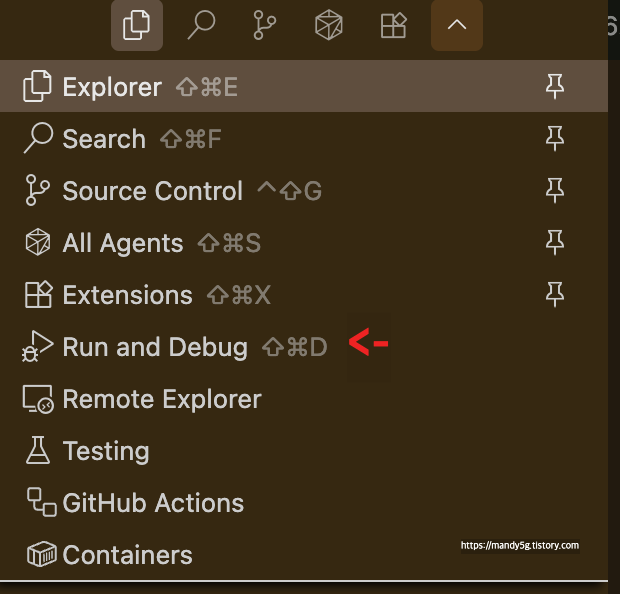
vscode에서 더보기를 눌러서 run and debug를 선택한다.
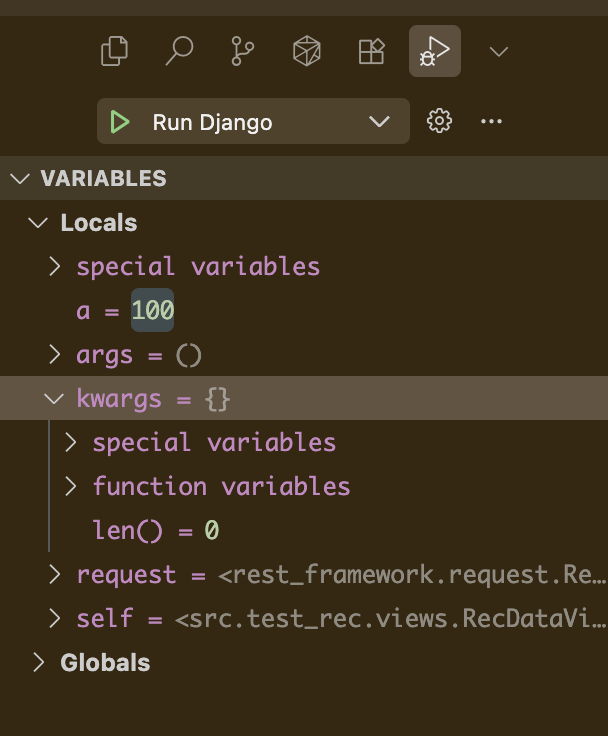
breakpoint를 찍은 다음에 Run Django를 하면 해당 break point를 찍은 부분이 나오는 것을 알 수 있다. (이후는 파이썬 디버깅과 동일)
디버깅할 때 값을 마음대로 바꿔서 실행할 수도 있다!
'Programming > Django' 카테고리의 다른 글
| 해결 이슈 모음: Django, Docker 기반 Rest API 서비스를 만들면서.. (0) | 2025.08.20 |
|---|---|
| EC2에서 Django + Docker 배포 중 발생한 run.sh 오류 해결기 (3) | 2025.08.14 |
| [Django] 중첩된 시리얼라이저(Nested Serializers) 완벽 이해하기 (1) | 2025.08.11 |
| DRF(Django REST Framework) 개발자를 위한 비교: APIView vs. Viewsets 🧐 (2) | 2025.08.07 |
| Serializer, 대체 뭘까? 🧐 (3) | 2025.08.07 |


